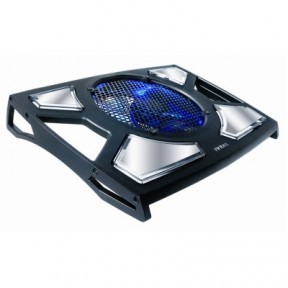
Antec 200 notebook cooler


Feature
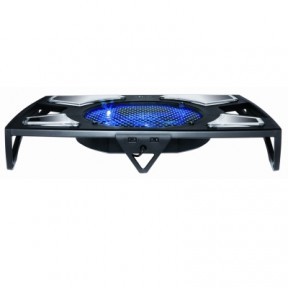
The Antec 200 is fairly large – it measures in at 420mm x 300mm x 68mm (WxDxH). Of course, this means that the cooler will work with a large selection of notebooks, including high-end 17” models.
Our first test was under “office work” conditions, that is, Word/Excel, music and Internet. With the Antec cooler inactive, HWMonitor gave us these maximum temperatures:
System Thermometer: 54°C
CPU Core0: 46°C
CPU Core1 : 47°C
Graphics Card : 45°C
Hard Drive: 38°C
We then repeated the test under the same conditions, for the same period of time. However, this time, we plugged in the Antec 200 and set it to the “High” performance level.
Test: Office Work, Cooler ON
System Thermometer: 48°C
CPU Core0: 42°C
CPU Core1 : 41°C
Graphics Card : 44°C
Hard Drive: 35°C
The numbers above are promising – the Antec cooler managed to lower all monitored temperatures by up to 6°C.
Of course, a more sensible application of such a cooler would be while playing demanding computer games. Naturally, we also examined this scenario as well. We played a variety of games, such as Burnout Paradise and Crysis: Warhead, to stress the laptop and the cooling power of the Antec 200. As before, we monitored the laptop’s various temperatures.
Our first tests were with the cooler off. These are the maximum temperatures we achieved.
Test: Various Games, Cooler OFF
System Thermometer: 74°C
CPU Core0: 68°C
CPU Core1 : 67°C
Graphics Card: 88°C
Hard Drive: 50°C
The areas for concern here are mainly the graphics card and the hard drive. Both temperatures are approaching the “concern zone”, and merit close attention.
Luckily, the Antec 200 notebook cooler was designed specifically to cool the various hot components of such a gaming laptop. To find out how effective the cooler is, we again played the same selection of games, but this time with the cooler plugged in and running at full blast.
System Thermometer: 70°C
CPU Core0: 64°C
CPU Core1 : 62°C
Graphics Card: 88°C
Hard Drive: 40°C
The effects of the Antec 200 are clearly noticeable here – all temperatures (except for the GPU) have dropped by at least 4°C, and the HDD temperature dropped a full 20%!
Sadly, the GPU remained unaffected by the cooler. However, we believe this is due to the construction of the notebook, as well as the fact that the GPU is simply too powerful to be properly cooled by mere flowing air. On the other hand, all other temperatures clearly went down, which should go a long way towards maximizing the lifespan of any high-end notebook.
Rating
We’ve rated the Antec 200 on a scale of 1-10, in a variety of categories. We will rate all upcoming notebook coolers in the same categories, so you will easily be able to compare them.
Looks: 8/10
Build Quality: 10/10
Cooling Performance: 7/10
Usability: 6/10
Portability: 4/10
Total: 7/10
All in all, the Antec 200 is a bit of a mixed bag. While the build quality is outstanding, and the cooling performance is satisfactory, the size of the cooler, along with the location of the controls, may be a bit of a deterrent. However, if you don’t plan on moving your cooler a lot, then the Antec 200 may well be a perfect fit for you and your laptop.